In this Stella Sora reroll guide, you will learn how to reroll, what to reroll, the reroll tier list, and much more. Get the top-tier characters for a head start through this reroll guide that actually works.

Stella Sora Reroll Guide
The easiest way to reroll on mobile in Stella Sora is by using the salt email method. When you launch the game, you will be asked to use a login method; Email, Google/Apple, or Guest.
Step 1.) Enter your email address
Don’t worry about rerolling because you can use the same email address to create a new account anytime. Guest account does not work on Global version. You can delete the guest account, but it will take 15 days. So the best way to reroll is by using the email option as a login method and utilizing salt email method.
Step 2.) Complete the initial tutorial
The tutorial at the start takes a few minutes. Skip the videos and scenes to progress faster.
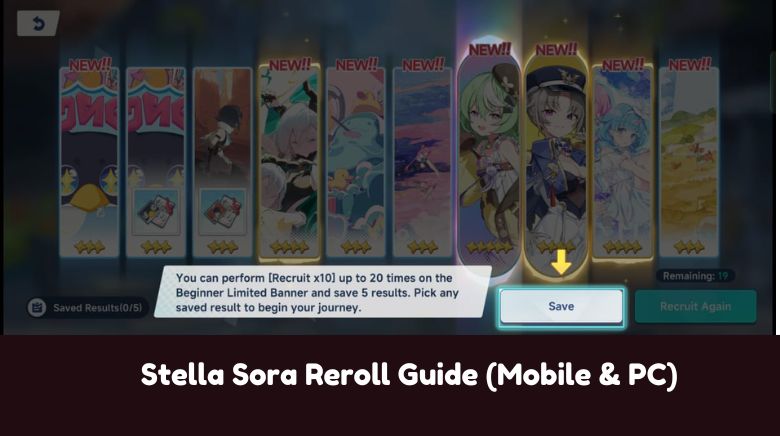
Step 3.) The 20-Times Pull
At the end stage of the tutorial, the game unlocks the recruitment feature that gives you 10 draws on beginner limited banner, which can be rerolled for 20 times. Keep rerollin until you get a top-tier 5-star character. From here, get at least one 5-star top-tier character(e.g. Nazuna). You can check the Stella Sora tier list here.
Step 4.) Collect the rewards from the in-game mailbox
After the step 3, the game will take you to the main screen and force you to build a team of three Trekkers. Continue from there and head back to the main screen/lobby of the game. In the top-right corner, tap the mail icon. Collect the rewards. The official release mail gives you 20 tickets.
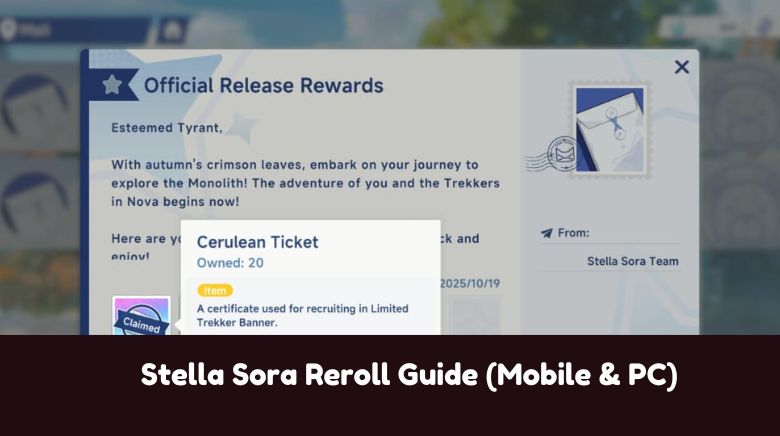
Step 5.) Spend the tickets
Once you have collected the 20 tickets from the in-game mail, head to the recruit menu and pull on the first banner that features Chitose. Aim for Chitose if you have not got her already.
Step 6.) Reroll or Continue
If you have got the two five-star characters – one being Chitose and another one also a top-tier one, continue playing the game. If you didn’t get the two top-tier five-star Trekkers, you should reroll. Here’s how to reroll:
- On the game’s main screen/lobby, tap the three lines menu button in the upper-right corner
- Choose settings
- Tap the GO button next to User Center option
- Choose Switch Account and Confirm
- The game will take you to the start screen
- Tap on “LOG IN TO ANOTHER ACCOUNT” option
- Enter the salt email address
- It’s the same email address of yours but with a + number
- For example: your email address is [email protected], then salt email address would be [email protected], [email protected], and so on. Just add a different number to your email address each time you reroll, the game will treat it as a new account and you will get the verification code on the same email address
Stella Sora Reroll Tier List: Best Trekkers To Reroll For
The best Trekkers to reroll for in Stella Sora are Chitose, Nazuna, and Gerie. All these three Trekkers are the top-tier ones and featured at the top-tier holder in most tier lists. Aim for two 5-star Trekkers – two of these three.

So that’s all I have in this post on Stella Sora Reroll Guide (Mobile & PC). This Stella Sora reroll guide is for mobile & PC users. If you are on emulator, consider using the new instance feature to create a new account, though it’s very tiresome.
Related:
Follow Us On Social Media: