Redeem the latest Currency Incremental codes to get free coins and boosters before they expire. Use these codes to speed up your progress, purchase upgrades faster, and grow your financial empire.
Updated Currency Incremental codes on July 9, 2026.
Currency Incremental is a classic Roblox tycoon-style game where your main goal is to stack as much cash as possible. You start by collecting basic currencies and spending them on upgrades to build up your financial empire. As you play, you can open magical runes for massive stat boosts and “sacrifice” your current progress to reset layers, which unlocks even more powerful features. It’s all about strategizing your resets to climb the global leaderboards.
This Roblox Currency Incremental Codes Wiki covers the latest list of working codes that reward coins and boosters, along with a guide on using the codes.
Before proceeding to the code list below, I highly recommend bookmarking this page and checking back regularly for updates. Developers regularly release new Currency Incremental codes; redeem them as soon as possible. All codes are time-limited, meaning they expire after a specified period.
All Currency Incremental Codes
Working Currency Incremental Codes are:
- 500KVISITS! = Misc. rewards (NEW)
- SORRYITSLASTSHUTDOWN! = Misc. rewards
- 250KVISITS! = Misc. rewards
- UPDATE1! = Misc. rewards
- SORRYDELAY1! = Misc. rewards
- MINIUPDATE = Misc. rewards
- QUICKFIXES1 = Misc. rewards
- RELEASE = Free Coins
- LOVE4COMMUNITY = Free Luck Boost [Community Code]
If you know any additional Currency Incremental codes that aren’t listed above, please let me know in the comments. If any code is not working, please share it as well. I will add new codes as soon as they are released!
Expired Codes
The following codes are not working anymore in the Roblox Currency Incremental:
Show Expired Codes
- N/A
Currency Incremental Codes FAQ
Q.) How do I redeem Currency Incremental Codes?
A: To redeem codes in Currency Incremental, follow these instructions:
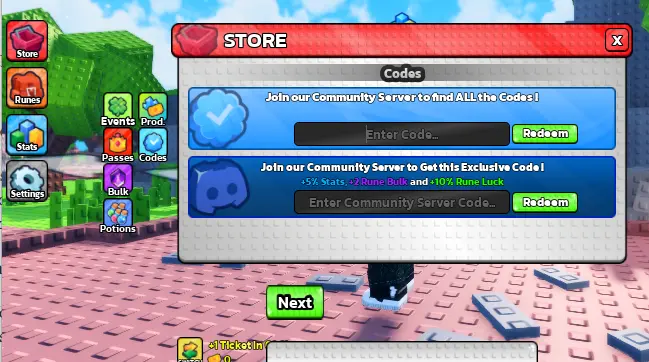
- Launch Currency Incremental on Roblox
- Click the shop button on the left
- On the shop window, scroll down to the bottom where you will find the code section
- Enter the code
- Hit the redeem button
- If the code is active, you will receive the rewards immediately
Q.) How to get more codes for Currency Incremental?
A: To get more codes for Currency Incremental, make sure to follow the game’s official Roblox page, join the Discord server, and keep an eye on their X (Twitter) account and YouTube channel for the latest updates. You should also revisit this page regularly, as new codes are often added to reward players with extra boosts and freebies.
Q.) Why are the codes for Currency Incremental not working for me?
A: If the codes shared above for the Currency Incremental didn’t work, they’re most likely expired. As mentioned above, codes have a time limit and are available only for a limited period. Once this time expires, they will no longer work. That’s why I recommend redeeming them as soon as they are out. Whenever a new update is released, check the official Discord, X, or this page for the latest code and redeem it as soon as possible.
Q.) When are the new codes for Currency Incremental released?
A: New codes for Currency Incremental are usually released during major game updates, when the game hits certain player milestones, and on special occasions or prominent days. Keep an eye out around these times, as they’re the most likely moments when new codes will be released.
Related:
That’s everything I have in this post about Currency Incremental Codes. Please have no hesitation to leave a comment below if you’ve found any working codes for Currency Incremental or have questions. I’ll do my best to reply quickly. If you know of any new codes not listed above, please share them in the comments so other players can benefit as well!